Apps › Rapidfire · Released
Rapidfire
A keyboard launcher made for you.
Version 1.0.5, released 23 November 2026. Free to download; a license is $20, one-time, for 3 Macs.
brew trust --cask deposombe/tap/rapidfire
brew install --cask deposombe/tap/rapidfire
Free to download, or installed with Homebrew. A license adds more palettes.
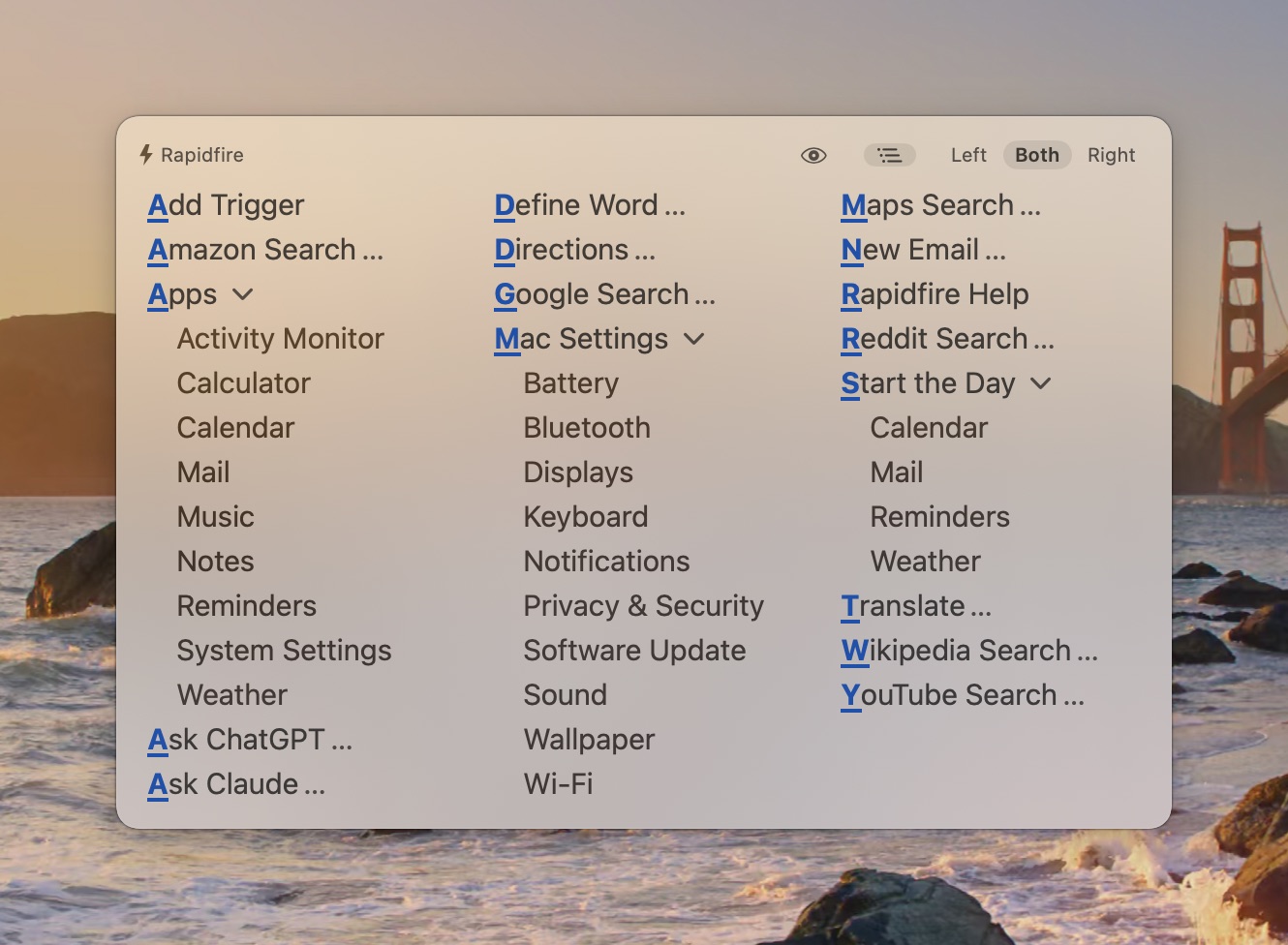
Press a hotkey. Rapidfire shows the links, apps, files and Shortcuts kept in it and marks, in each name, the letters that tell it apart. Type them, and it opens. There is no Return to press and no name to recall.
Rapidfire is AI-first and MCP-ready, so you can make it exactly as you want it. Connect an AI assistant and ask it, in plain words, to build palettes, shorten names or move triggers. Every change it makes is listed and can be reverted. Rapidfire contains no AI of its own and generates nothing: the assistant is a program of your choice on your Mac, and connects to Rapidfire there.
Keys without setup
- Two or three keys reach a trigger among hundreds.
- The same names give the same keys, on every Mac.
- A trigger opens the moment it is the only one left.
Anything with a link
- Web pages, apps, files and folders, Shortcuts, BetterTouchTool and Keyboard Maestro actions, System Settings panes.
- A link can ask for text first: one trigger searches a website or hands text to a Shortcut.
- Holding Control opens a whole palette at once.
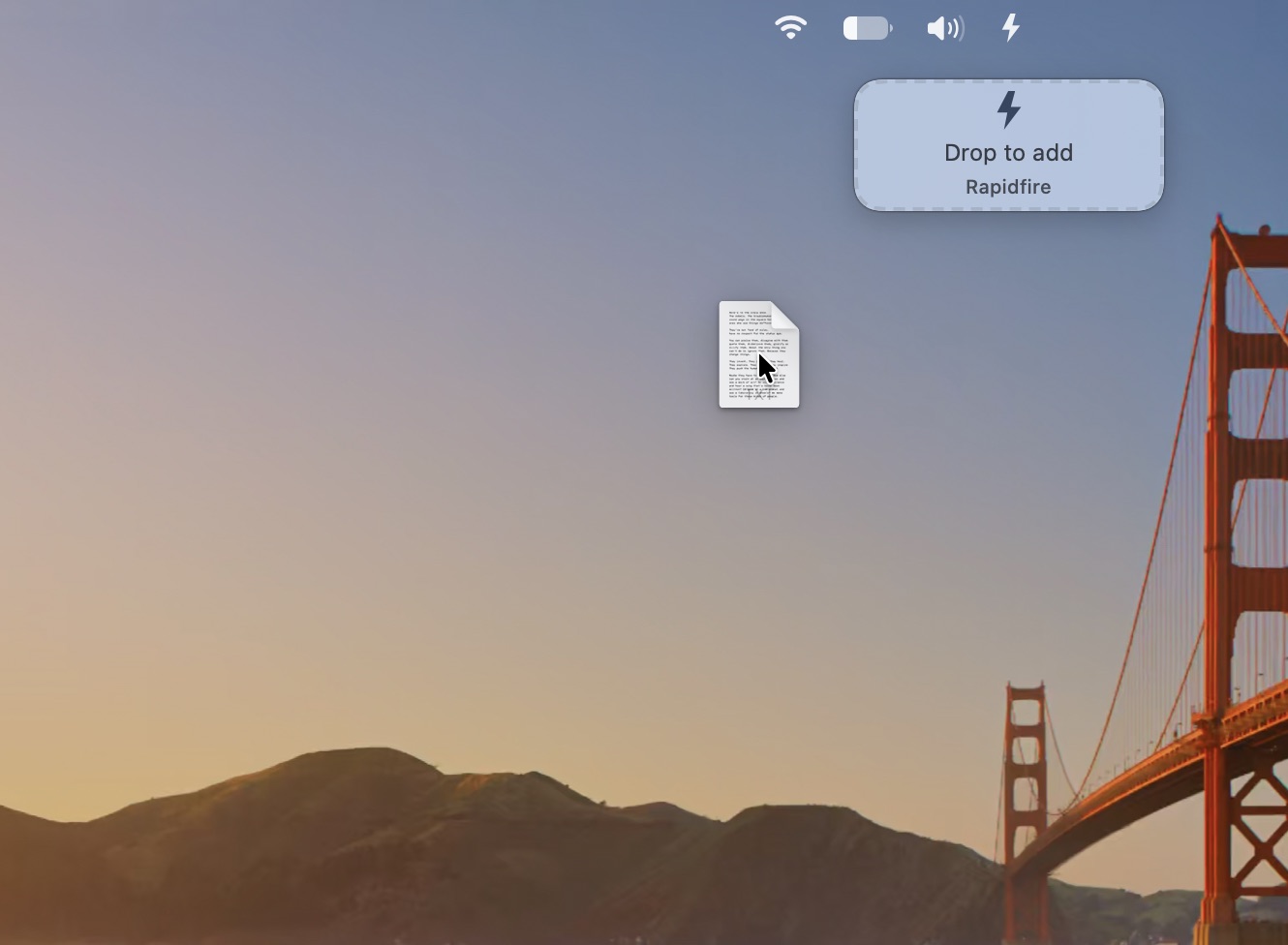
- Dragging a URL from a browser, or a file, a folder or an app, onto the menu bar icon opens Quick Add.
Habits are protected
- Before a trigger is added, Rapidfire lists the triggers whose keys it would change, most used first.
- Locked keys reserve exact keys for one trigger.
- Every change can be undone.
A library that stays manageable
Palettes besides General, and what is built on them, need a license.
- Palettes group triggers, each with its own hotkeys, and any palette can be shown inside another.
- Show All unfolds every folder, so the whole library is on screen at once.
- A dynamic palette shows a different palette by time, network or the app in front.
One hand is enough
With one hand on the mouse, every key of the far half of the keyboard is typed with its mirror key on the near half.
Works with the rest of the Mac
- iCloud sync keeps the library the same on every Mac.
- Spotlight, Siri and the Shortcuts app can find and open triggers.
- An AI assistant can read and edit the library through Rapidfire's MCP server; every change it makes is listed and can be reverted.
- VoiceOver, Voice Control, Switch Control and keyboard-only use are supported.
Download
Rapidfire 1.0.5 is a disk image of 7.9 MB. Open it and drag Rapidfire to the Applications folder. Rapidfire updates itself from then on.
With Homebrew, the two lines at the top of this page do the same. Homebrew 7 and later install a cask from outside Homebrew's own collection only after it has been trusted; that is the first line. Older versions need only the second.
The download is free and works without a license: one palette, General, complete and with no time limit.
Price
$20, one-time. One license works on 3 Macs. All 1.x updates are included.
Without a license Rapidfire is a complete launcher with one palette, General, and no time limit. A license adds more palettes, their own hotkeys, and palettes inside palettes. What needs a license shows a padlock; there are no reminders.
The license key is sent by email as soon as the payment is made, and is also in Polar's customer portal. It is entered in Settings › License. Rapidfire itself can be downloaded now, before or after buying.
Licenses are sold by Polar (Polar Software, Inc.), the reseller and merchant of record: Polar is the seller, takes the payment and handles tax and invoices. It is a single payment; nothing renews.
Refunds within 14 days of the purchase, no reason needed: write to support@deposombe.com. Refunds are paid by Polar to the original payment method.
Requirements
macOS 15 Sequoia or later, on a Mac with Apple silicon. The app is universal and includes an Intel build.
Changes
1.0.5, 23 November 2026. If Rapidfire quits unexpectedly, it offers to send a crash report the next time it opens: by email from the mail app, with everything in the report shown first. Nothing is sent by Rapidfire itself. Help › Report a Problem opens the same window for any other problem.
1.0.4, 22 November 2026. Large libraries are much faster: Show All on 2,240 triggers in 320 palettes opens in about half a second instead of over a minute. Show All can show only the folders, each with how many triggers it holds. Before opening a whole palette, Rapidfire asks in the overlay, in place of the list.
1.0.3, 21 November 2026. A pinned overlay now follows a dynamic palette: when the palette is switched, the overlay shows the new triggers at once.
1.0.2, 21 November 2026. Opened by a click on the menu bar icon, the overlay no longer shows a blue focus ring around the pin (seen on macOS 15).
1.0.1, 21 November 2026. The pinned overlay can be moved.
- Watching now has a pin in place of the eye. Press ⌘K or click the pin to keep the overlay open.
- A pinned overlay can be dragged by its top row or by the margin around the list, for example beside the window of an AI assistant. It grows from its top left corner as triggers are added. Closing it unpins it, and the next overlay opens in its usual place.
- A small light beside the pin is on while an AI assistant uses Rapidfire through MCP.
- With VoiceOver, the pin's actions move the overlay to a corner of the screen.
1.0, 21 November 2026. The first release.